
Behind the tech
An event driven architecture, Part 4
To ease the development of EDA services we created a dedicated framework, Eventail, that abstracts away the topology and all required behaviors of the services…
October 19, 2026
Behind the tech

It’s often claimed that Elm developers should avoid thinking their views as stateful components. While this is indeed a general best design practice, sometimes you may want to make your views reusable (eg. across pages or projects), and if they come with a state… you end up copying and pasting a lot of things.
We recently published elm-daterange-picker, a date range picker written in Elm. It was the perfect occasion to investigate what a reasonable API for a reusable stateful view component would look like.
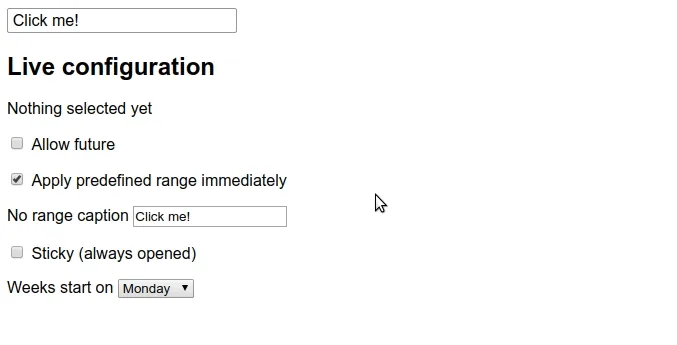
Many component/widget-oriented Elm packages feature a rather raw Elm Architecture (TEA) API, directly exposing Model, Msg(..), init, update and view, so you can basically import what defines an actual application and embed it within your own application.

With these, you usually end up writing things like this:
import Counter

type alias Model =
    { counter : Counter.Model
    , value : Maybe Int
    }

type Msg
    = CounterMsg Counter.Msg

init : () -> ( Model, Cmd Msg )
init _ =
    ( { counter = Counter.init, value = Nothing }
    , Cmd.none
    )

update : Msg -> Model -> ( Model, Cmd Msg )
update msg model =
    case msg of
        CounterMsg counterMsg ->
            let
                ( newCounterModel, newCounterCommands ) =
                    Counter.update counterMsg
            in
            ( { model
                | counter = newCounterModel
                , value =
                    case counterMsg of
                        Counter.Apply value ->
                            Just value

_ ->
                            Nothing
              }
            , newCommands |> Cmd.map CounterMsg
            )

view : Model -> Html Msg
view model =
    div []
        [ Counter.view model.counter
            |> Html.map CounterMsg
        , text (String.fromInt model.value)
        ]
This certainly works, but let’s be frank for a minute and admit this is super verbose and not very developer friendly:
Cmd.map and Html.map here and thereCounter.Msg to intercept whatever event interests you…Counter exposes all Msgs, which are implementation details you now rely on.
There’s another way, which Evan explained in his now deprecated elm-sortable-table package. Among the many good points he has, one idea stroke me as brilliantly simple yet effective to simplify such stateful view components API design:
State updates can be managed right from event handlers!
Let’s imagine a simple counter; what if when clicking the increment button, instead of calling onClick with some Increment message, we would call a user-provided one with the new counter state updated accordingly?
-- Counter.elm
view : (Int -> msg) -> Int -> Html msg
view toMsg counter =
    button [ onClick (toMsg (counter + 1)) ]
        [ text "increment" ]
Or if you want to use an opaque type, which is an excellent idea for maintaining the smallest API surface area:
-- Counter.elm
type State
    = State Int

view : (State -> msg) -> State -> Html msg
view toMsg (State value) =
    button [ onClick (toMsg (State (value + 1))) ]
        [ text "increment" ]
Note that as we’re dealing with a counter state, we didn’t bother having anything else than a simple Int for representing it. But you could of course have a record or anything you want.
Handling internal state update could be just creating internal and unexposed Msg and update functions:
-- Counter.elm
type State
    = State Int

type Msg
    = Dec
    | Inc

update : Msg -> Int -> Int
update msg value =
    case msg of
        Dec ->
            value - 1

Inc ->
            value + 1

view : (State -> msg) -> State -> Html msg
view toMsg (State value) =
    div []
        [ button [ onClick (toMsg (State (update Dec value))) ]
            [ text "decrement" ]
        , button [ onClick (toMsg (State (update Inc value))) ]
            [ text "increment" ]
        ]
We should also expose helpers to retrieve (or set) values from the opaque State type:
-- Counter.elm
getValue : State -> Int
getValue (State value) =
    value
So for instance, to use this Counter component in your own application, you just have to write this:
import Counter

type alias Model =
    { counter : Counter.State
    , value : Maybe Int
    }

type Msg
    = CounterChanged Counter.State

init : () -> ( Model, Cmd Msg )
init _ =
    ( { counter = Counter.init, value = Nothing }
    , Cmd.none
    )

update : Msg -> Model -> ( Model, Cmd Msg )
update msg model =
    case msg of
        CounterChanged state ->
            ( { model | counter = state, value = Counter.getValue state }
            , Cmd.none
            )

view : Model -> Html Msg
view model =
    div []
        [ Counter.view CounterChanged model.counter
        , text (String.fromInt model.value)
        ]
Notice how our update function is dramatically simpler to write and to understand. Also, no need to import (and rely) a lot from the package module, which makes it both easier to consume & maintain thanks to to the opaque State type encapsulating implementation details.
Of course a counter wouldn’t be worth creating a package for it, though this may highlight the concept better. Don’t hesitate reading elm-daterange-picker’s source code and demo code to look at a real world application of this design principle.
Behind the tech
To ease the development of EDA services we created a dedicated framework, Eventail, that abstracts away the topology and all required behaviors of the services…
October 19, 2026
Behind the tech
Here, we will discuss the monitoring tools used by uh!ive to oversee these services. Monitoring tools not only allow us to stay informed about…
July 23, 2026